PowerBlissTV Panel
Reseller
Sales Overview
Sales Overview

TV Subscriptions
Sales Overview
Sales Overview
Sales Overview
Web Site Sales
Web Site
Sales Overview
Reseller Blog
Web Site Editor
Reseller Blog
Microsoft 365 Business
Reseller Blog
Telegram online for TVsupport
Microsoft 365 Business
Microsoft 365 Business
Microsoft 365 Business
Email and communication.
Display their FAQs
Microsoft 365 Business
Microsoft 365 Business
PowerBlissTV Subscribers Information
Installing PowerBlissTV on your Fire TV stick
Once you have finished registering your Fire TV stick
1. (Remote) Click the home button
2. Click Settings - click down
3. Move to the right click My Fire TV
4. Click Developer Options
5. Turn on Apps from Unknown Source
6. (Remote) Click the back button 2 times
7. Click Preferences
8. Click Privacy Settings
9. turn off:
- a. device usage
- b. collecting app usage data
- c. Internet based ads
10. (Remote) Click the Home Button
11. Open the app Downloader (2 ways to do it)
- a. (Remote) Hold down Microphone and say downloader (if you don’t have the microphone button)
- b. Move to the left, click the hourglass, type downloader and then click on it below.
i. If you already have the app go to step 12; if not continue.
ii. Click Download (If you have additions prompts)
1. Details or Cancel - click Details and then download
2. If you cannot install, it's because you don’t have 1-click turned on. You will have login into your Amazon account (use your computer or phone), enter your Account settings, turn on 1-click and have a credit card on file.
12. OPEN
13. Allow Downloader to access photos… OK
14. At the http:// Move your blinking cursor to the left to the orange section, and click on browser
15. The red circle in the middle on the screen is a mouse, (remote) move it to the top of the screen, click enter and the keyboard will appear.
16. Click the Clear button in the lower right corner to clear the URL
17. Text powerbliss.com/tv then click GO
18. The red mouse will be at the top of the screen, scroll down to ** CURRENT APP ** and click on BLISSTV white button.
19. Downloading the app will been
20. Once the file is downloaded the NEXT will change to INSTALL; Click it.
21. Click OPEN
22. Click Add User in the top right corner
23. Enter your Login Details
a. Name: (Anything you like)
b. Username: (your email)
c. Password: (Your password was emailed to you)
24. Click Add Account (Note: if you don’t get “Add account (successful)” you typed something wrong).
25. Click on Install TV Guide in the lower right corner
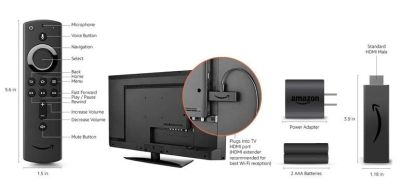
Installing PowerBlissTV on your Fire TV Stick v1
Once you have finished registering your Fire TV stick
1. (Remote) Click the home button
2. Click Settings - click down
3. Move to the right click My Fire TV
4. Click Developer Options
5. Turn on Apps from Unknown Source
6. (Remote) Click the back button 2 times
7. Click Preferences
8. Click Privacy Settings
9. turn off:
- a. device usage
- b. collecting app usage data
- c. Internet based ads
10. (Remote) Click the Home Button
11. Open the app Downloader (2 ways to do it)
- a. (Remote) Hold down Microphone and say downloader (if you don’t have the microphone button)
- b. Move to the left, click the hourglass, type downloader and then click on it below.
i. If you already have the app go to step 12; if not continue.
ii. Click Download (If you have additions prompts)
1. Details or Cancel - click Details and then download
2. If you cannot install, it's because you don’t have 1-click turned on. You will have login into your Amazon account (use your computer or phone), enter your Account settings, turn on 1-click and have a credit card on file.
12. OPEN
13. Allow Downloader to access photos… OK
14. At the http:// Move your blinking cursor to the left to the orange section, and click on browser
15. The red circle in the middle on the screen is a mouse, (remote) move it to the top of the screen, click enter and the keyboard will appear.
16. Click the Clear button in the lower right corner to clear the URL
17. Text powerbliss.com/tv then click GO
18. The red mouse will be at the top of the screen, scroll down to ** CURRENT APP ** and click on BLISSTV white button.
19. Downloading the app FileLinked will begin
20. Once the file is downloaded the NEXT will change to INSTALL; Click it.
21. Click OPEN
22. Click enter the Code section.
23. Enter code: 94102518 then Next
24. Click Continue (Note Dismiss and advertisement ads)
25. Select app BST Multiview v.2.2 (Newest) Note: the name might change as we upgrade versions but all the versions listed will work.
26. Once the bar completes across the screen click ENTER
27. Once the file is downloaded click INSTALL
21. Click OPEN
22. Click Add User in the top right corner
23. Enter your Login Details
a. Name: (Anything you like)
b. Username: (your email)
c. Password: (Your password was emailed to you)
24. Click Add Account (Note: if you don’t get “Add account (successful)” you typed something wrong).
25. Click on Install TV Guide in the lower right corner

PowerBlissTV Reseller Program
How to become a reseller
Our simple methods to help expand our service and offer an easy way for you to make some extra money.
Payouts:
Every single subscription sale, you earn $15.00.
BONUS
If your customer wants their device set up, you can set your own price.
Requirements, you must have:
(1) A PowerBlissTV subscription in good standing for more than 3 months
(It's always easier to sell when you are a client yourself).
(2) Cash App
(3) Some Knowledge about the product.
(4) One account per user! YOU CANNOT SELL 1 ACCOUNT TO 3 PEOPLE!!
(5) NO FACEBOOK ADS!!!